Everything you need to know about buying and selling domains on DomainWorld — step by step.
No login required to browse. Every domain and bundle listed on DomainWorld is visible to the public. Use the filters to narrow by category, listing type, or price range.
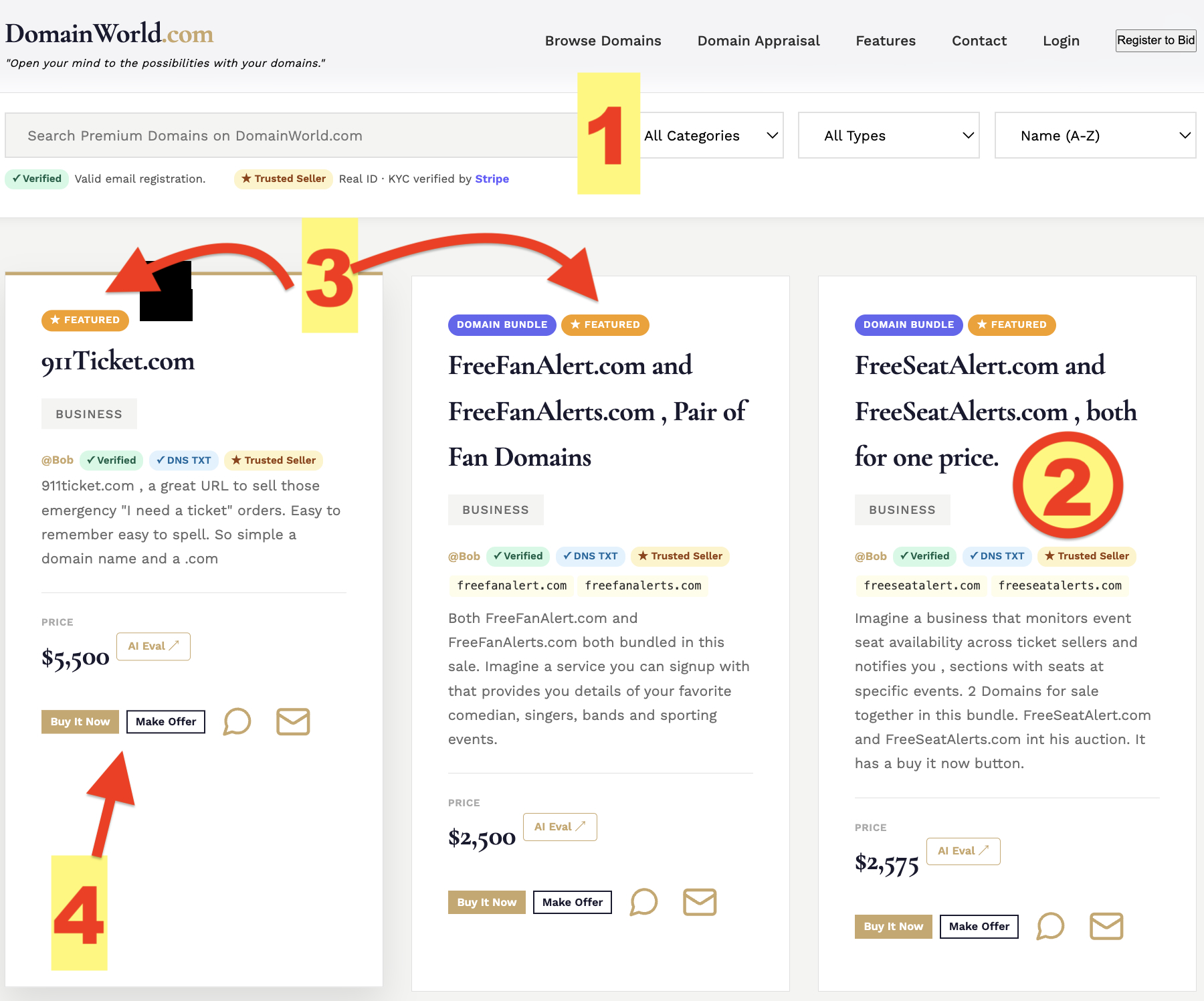
Filter by category (Tech, Finance, Lifestyle, etc.), listing type (Auction, Fixed Price, or Bundle), and price range. Results update instantly — no page reload.
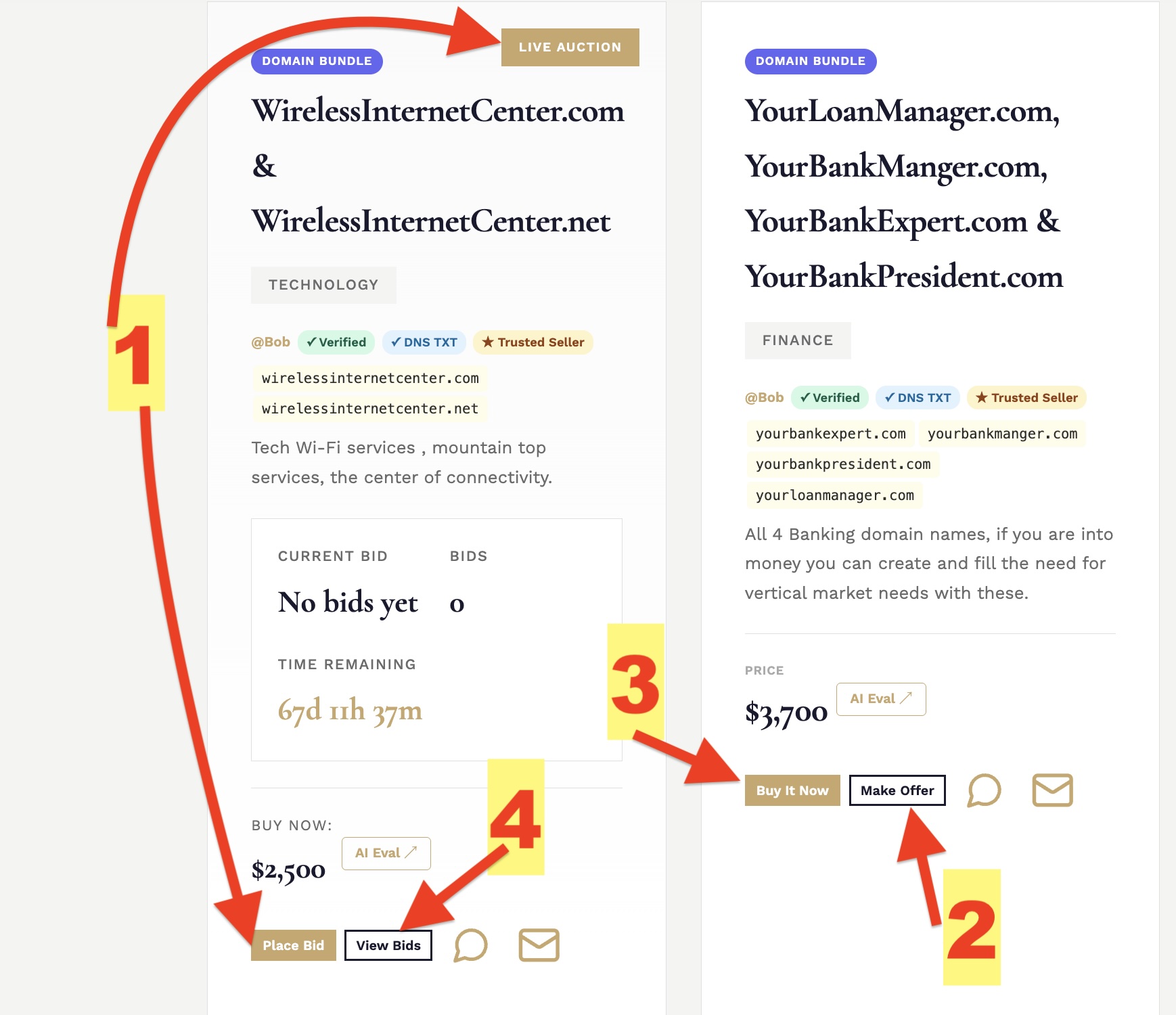
Each card shows the domain name, category, price or current bid, listing type, and any badges (★ Featured, ✓ Trusted Seller, ✓ DNS TXT). Click a card to see full details.
Gold badge at the top of the grid. Sellers pay to pin their listing here for 30 days — it means the seller is serious, not that the price is higher.
Action buttons appear directly on each card. Auctions show "Place Bid," fixed-price listings show "Make an Offer" and "Buy It Now."
Registration is free and takes under a minute. New members receive 150 free credits — enough to post your first listing and try several features before spending a dollar.
Click "Register to Bid" on the homepage. Enter your name, email, and choose a password. You'll receive a verification email — click the link to activate your account.
Once verified, you're assigned a unique bidder number (e.g. DW00042). This is your public identity on DomainWorld — it appears on bids and offers without revealing your name.
100 credits are added to your account automatically upon verification. Credits are used only when you take a paid action — browsing and bidding are always free.
Visit Buy Credits to top up anytime. Purchased credits are valid for 365 days; free and bonus credits expire in 90 days. No subscription, no monthly fee.
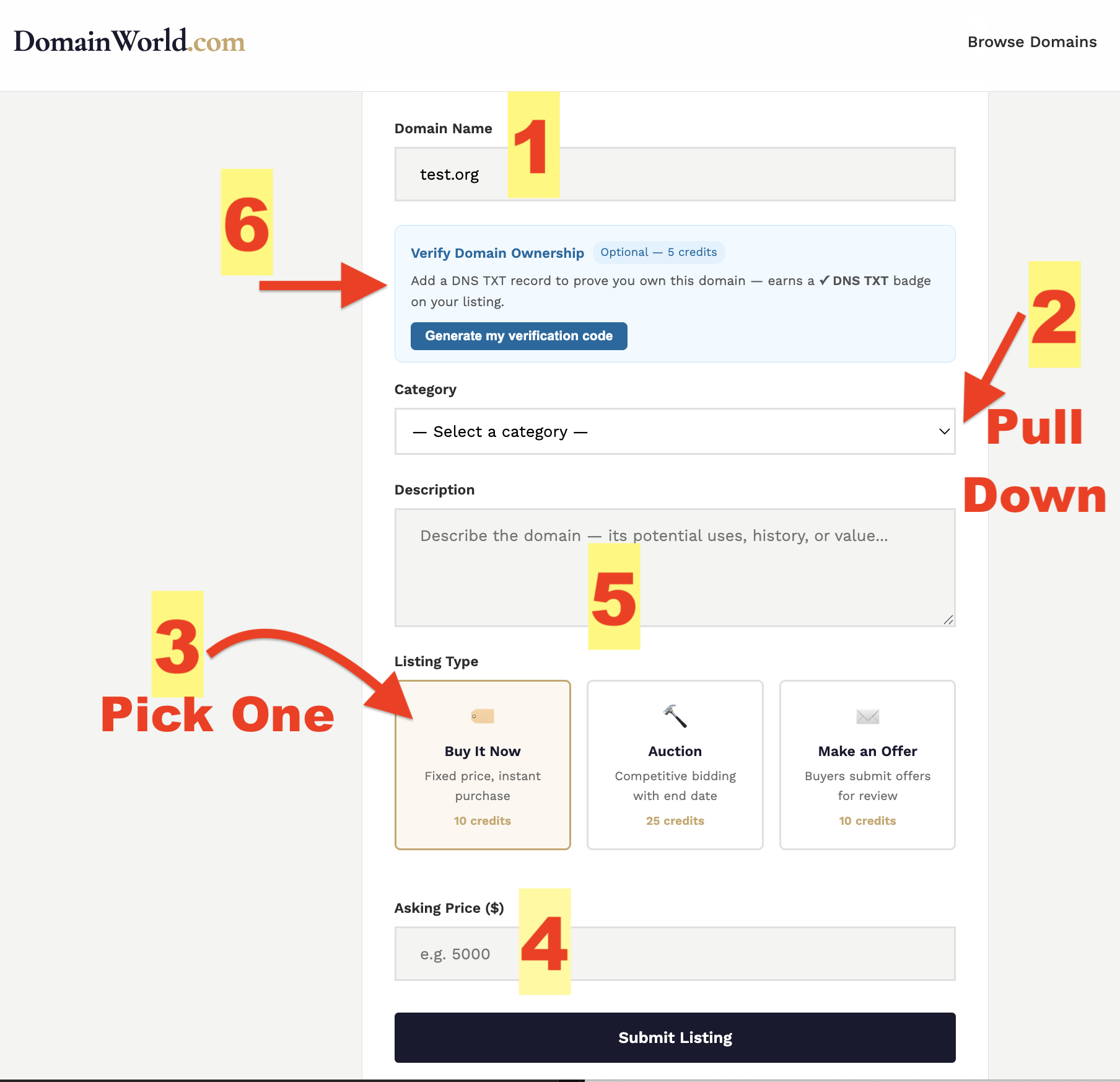
Posting a domain costs 10 credits (about $0.50). You set the terms — auction, fixed price, rent-to-own, or bundle. No commission is charged when it sells.
Enter the exact domain name you're selling (e.g. premiumname.com). Double-check spelling — this is what buyers will see.
Choose the category that best fits your domain (Tech, Finance, Lifestyle, etc.). Buyers filter by category, so picking the right one gets you more views.
Auction — buyers bid, highest wins at close. Fixed Price — set a Buy It Now price; buyers can also Make an Offer. Choose what fits your strategy.
For auctions, set a starting bid and optional reserve price. For fixed-price, set your asking price. Supports 135+ currencies.
Tell buyers what makes this domain valuable — traffic history, niche relevance, memorability. A strong description closes deals faster.
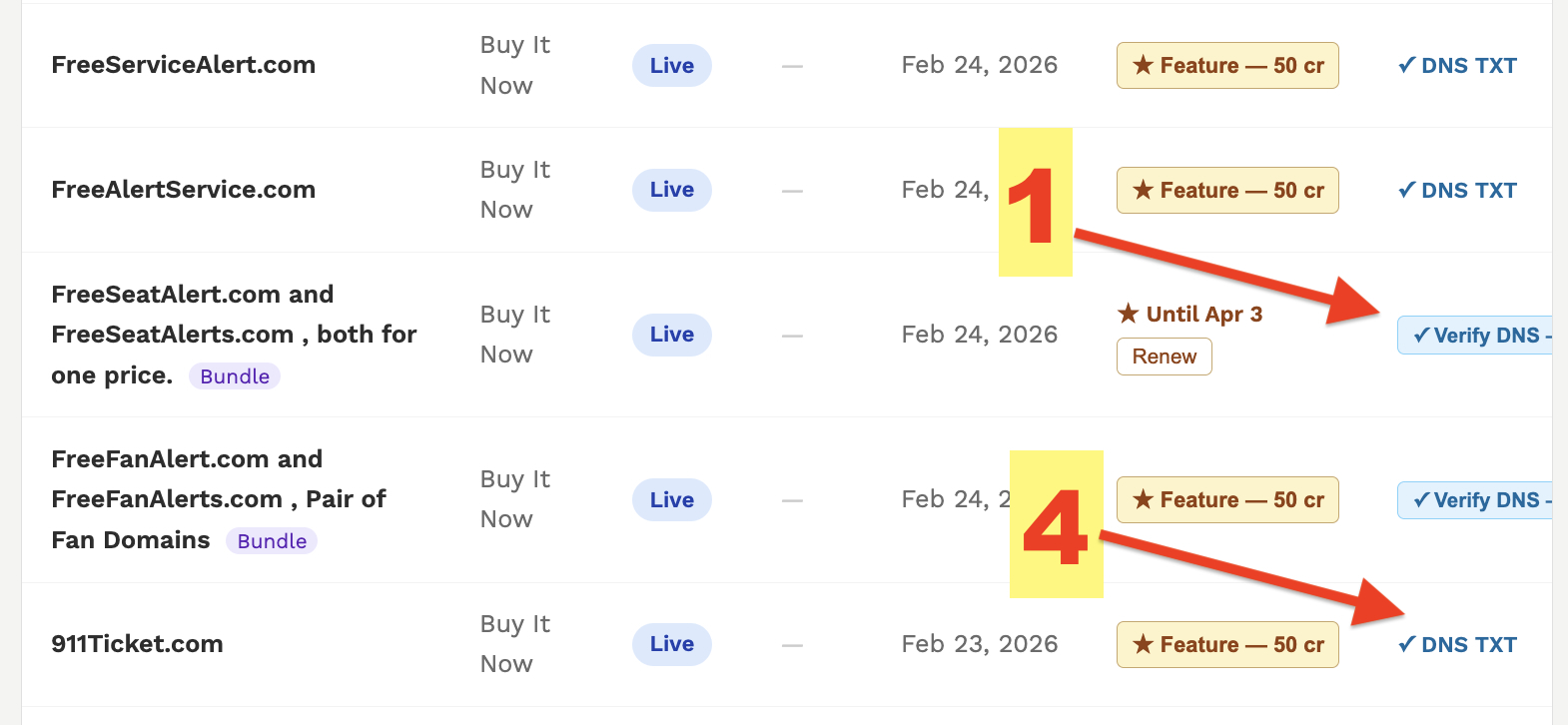
Prove you own the domain before listing by adding a TXT record at your registrar. Adds a ✓ DNS TXT badge that builds buyer trust. See the DNS TXT section below.
Bidding and making offers are free — no credits required. You negotiate directly with the seller; DomainWorld takes no commission on the deal.
Click "Place Bid" on any auction listing. Enter an amount above the current bid. You'll be identified by your bidder number only — your name and email stay private.
On fixed-price listings, click "Make an Offer" and enter your proposed amount with an optional message. The seller reviews and can accept, counter, or decline.
If the seller has enabled Buy It Now, click the button to proceed at the listed price. This opens a direct contact with the seller to complete the transfer.
Click "Bid History" on any auction card to see all bids placed, amounts, and timestamps. All bids are public — bidder numbers only, no personal details.
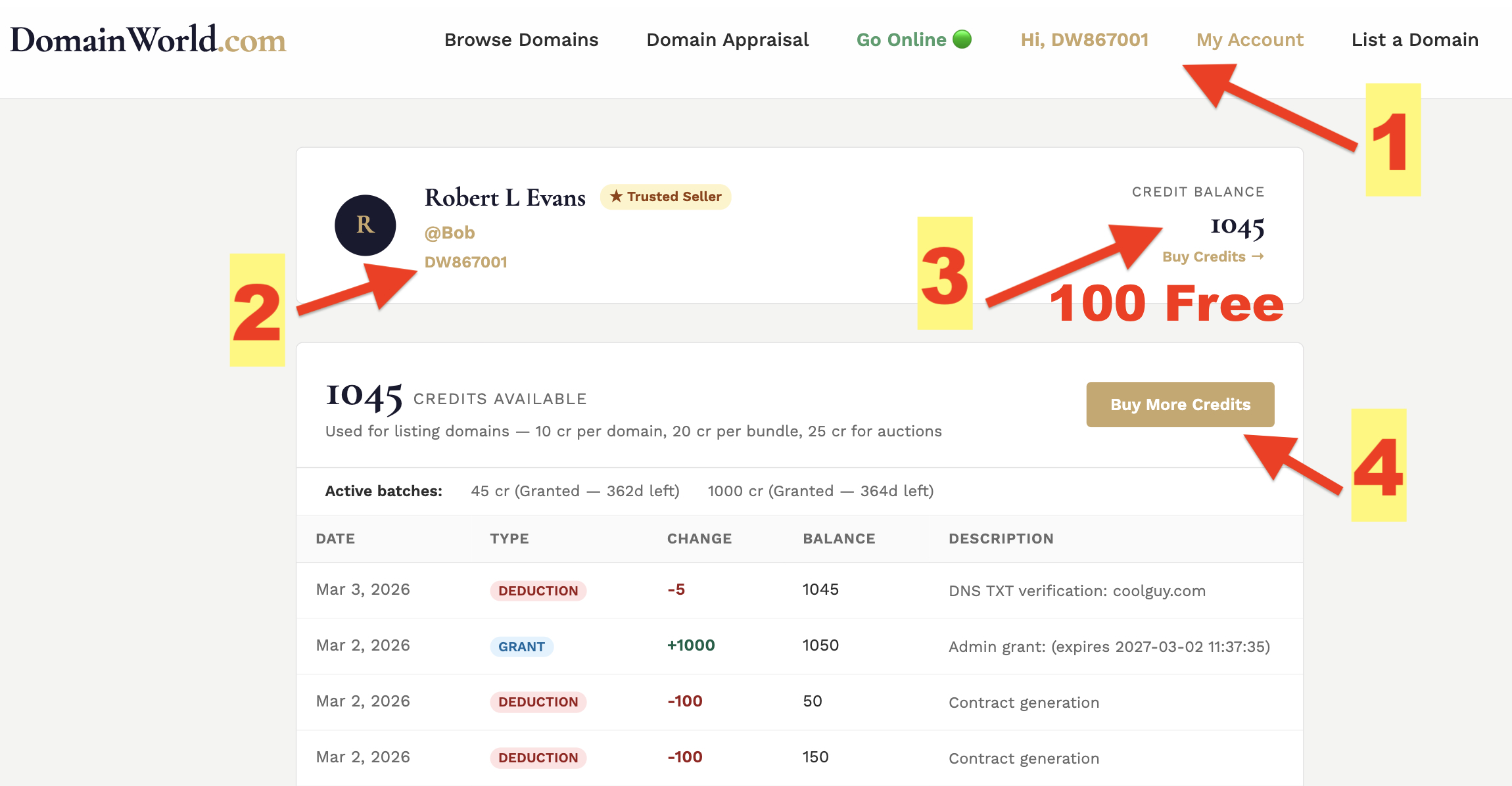
Your dashboard is your control center — manage listings, track bids, monitor your credit balance, and access all seller tools in one place.
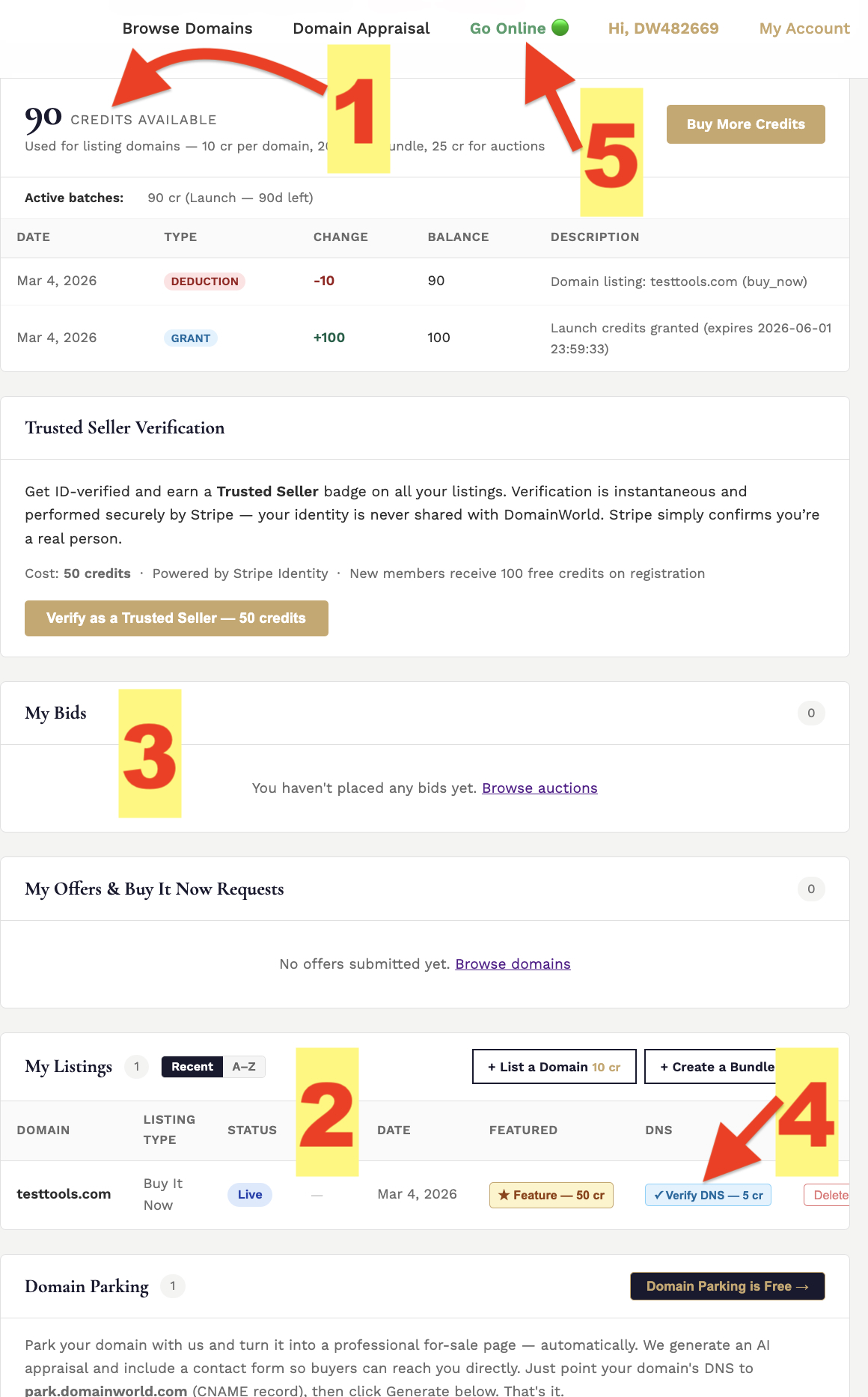
Your current credit balance is shown at the top. Click "Buy Credits" to top up. Your balance updates immediately after any action that uses credits.
All domains and bundles you've posted, their current status (Active, Draft, Sold, Expired), current bid or price, and quick action buttons for each.
Every bid you've placed, which auction it belongs to, the current high bid, and whether you're still winning. Updated in real time.
Action buttons on each listing let you add DNS TXT verification or pay to feature the listing — right from the dashboard without re-opening the listing form.
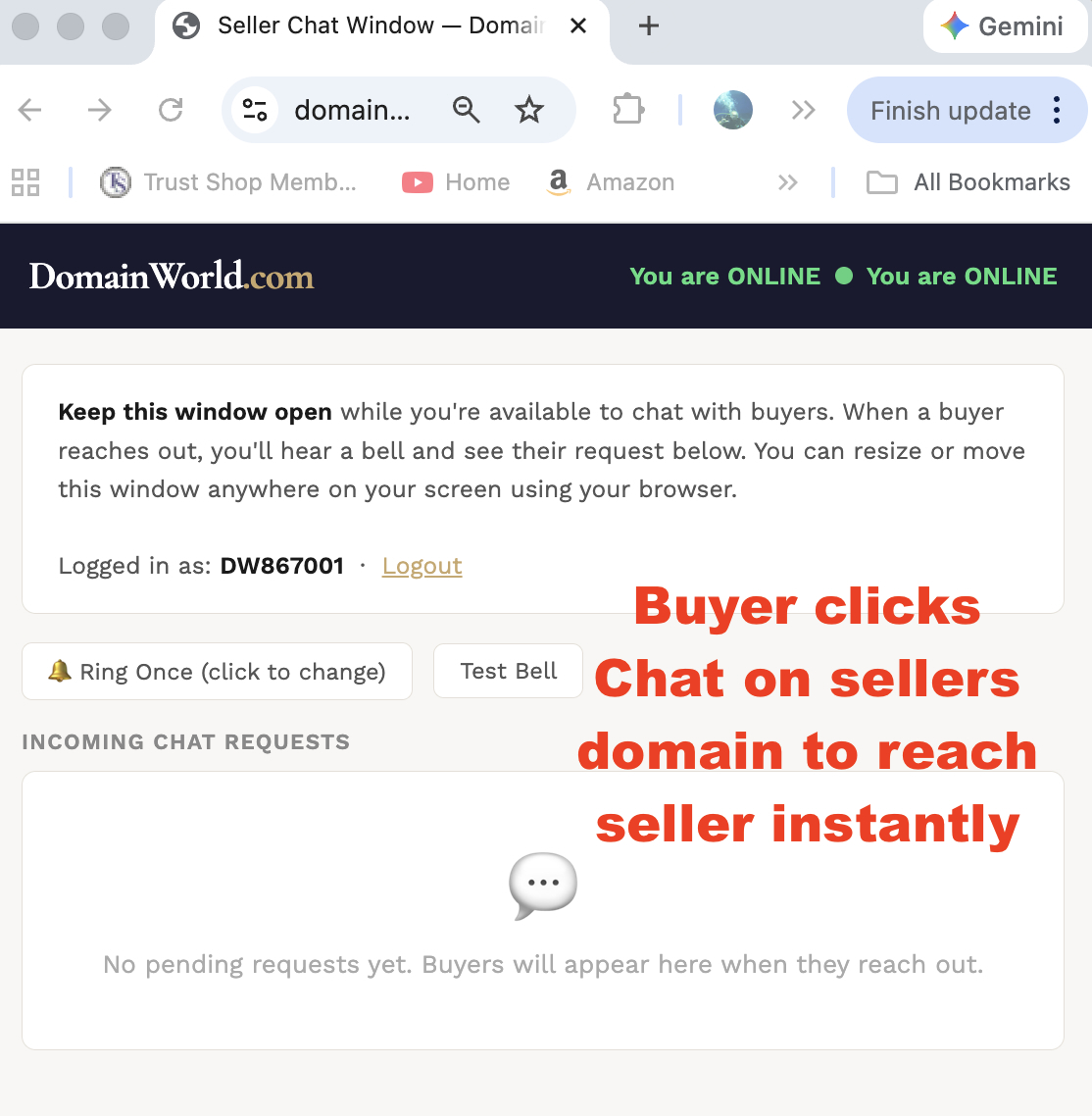
Opens your seller presence window in a new tab. While it's open, buyers can see you're available and initiate a live chat. Close it when you step away.
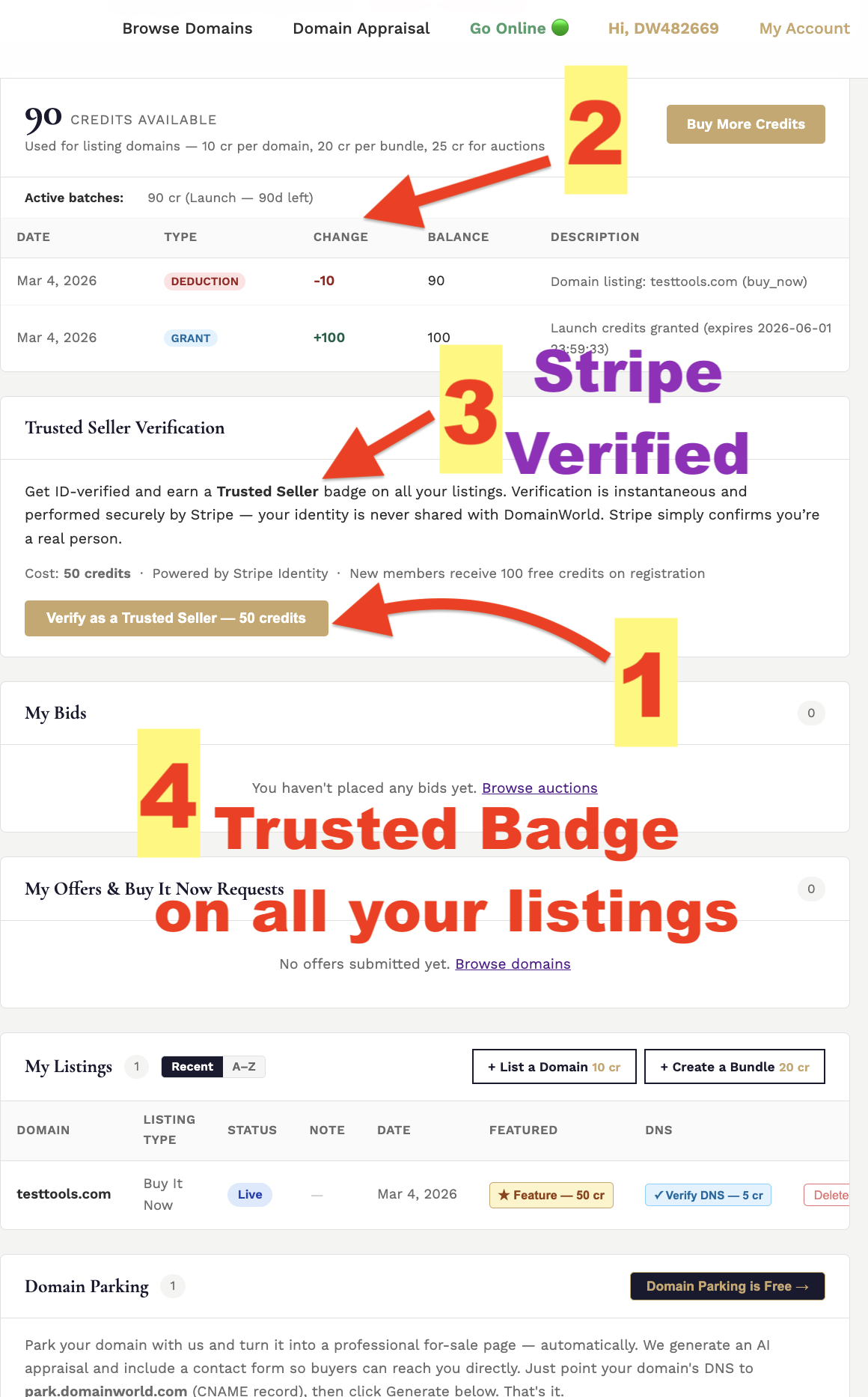
The gold ★ Trusted Seller badge tells buyers they're dealing with a real, identity-verified person — not an anonymous account. Verification is powered by Stripe Identity, the same technology used by banks and major platforms. Fast, private, and costs just 50 credits ($2.50).
From your dashboard, click "Verify Identity." You'll be guided through Stripe Identity's secure flow — typically a government ID scan and a quick selfie. Takes about 2 minutes.
50 credits are deducted when your verification is approved. If verification is not approved, no credits are charged.
Once verified, the ★ Trusted Seller badge automatically appears on every listing you post — current and future. No action needed per listing.
Domain transfers involve real money and real trust. A verified badge signals the seller has passed identity checks — dramatically reducing fraud risk and giving buyers confidence to proceed.
Prove you actually own and control a domain by adding a unique TXT record at your registrar. This adds a ✓ DNS TXT badge to your listing — a technical signal that only a real domain owner can produce. Costs 5 credits ($0.25).
Click "Verify DNS" on your listing (during posting or from your dashboard). A unique code is generated — something like dw-verify=DW-00042-a3f9c1b2. Copy it.
Log in to wherever your domain is registered (GoDaddy, Namecheap, Cloudflare, etc.). Go to DNS settings and add a new TXT record:
Host: @
Value: DW-code-you-received
Save the record at your registrar.
Return to DomainWorld and click "Check DNS." The system looks up your domain's TXT records. DNS can take a few minutes to propagate — if not found yet, wait and try again.
Once the TXT record is detected, 5 credits are deducted and your listing shows the ✓ DNS TXT badge. You can leave the TXT record in place permanently — it doesn't affect your domain.
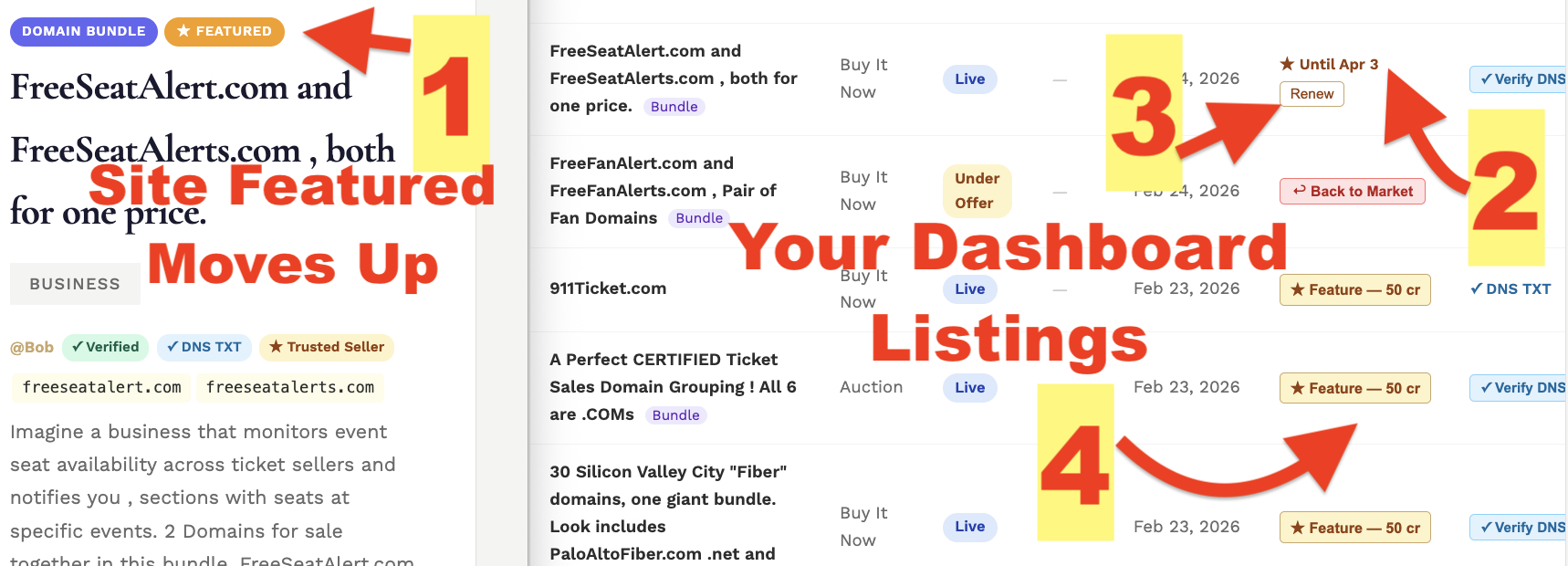
Pay to pin your domain or bundle to the top of the browsing grid with a gold ★ Featured badge for 30 days. Buyers see featured listings first — prime real estate for serious sellers.
On any active listing in your dashboard, click "Feature — 50 cr." Confirm the credit deduction and your listing moves to the top of the grid immediately.
Your listing stays featured for 30 days from the date you pay. Your dashboard shows the exact expiry date — "★ Featured until Mar 15, 2026."
You can renew before expiry — the 30-day clock resets from today. Re-featuring while still active costs the same as the first time.
Your listing automatically returns to the regular grid. No action needed — it stays live, just no longer pinned to the top. Feature it again whenever you like.
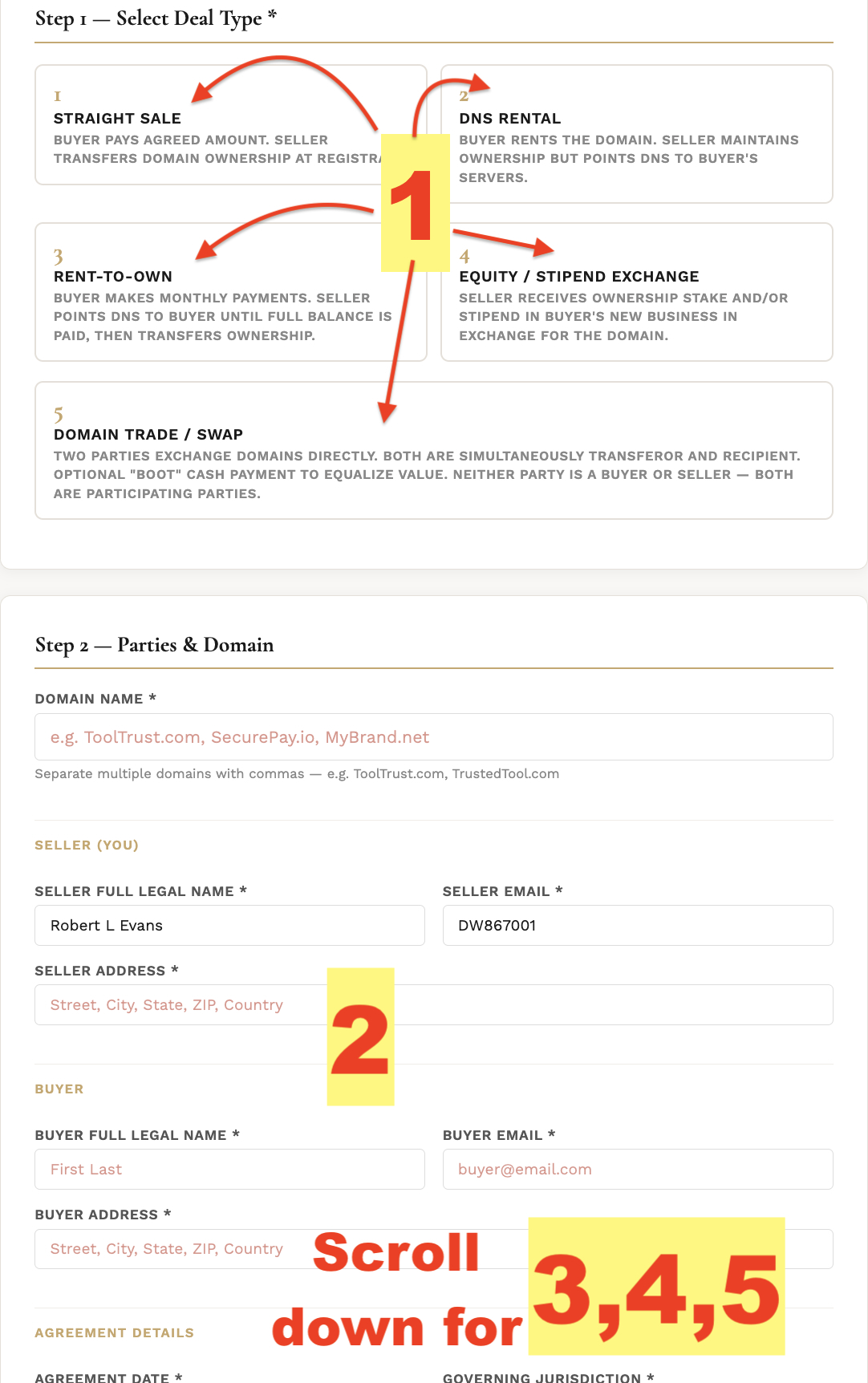
Generate a professional domain sale contract in seconds. Five deal types — Straight Sale, DNS Rental, Rent-to-Own, Equity/Stipend, and Trade/Swap. Lawyer-quality language, your terms, your deal. Costs 200 credits ($10.00) per generation.
Select the deal structure that matches your agreement — Straight Sale, DNS Rental, Rent-to-Own, Equity/Stipend, or Trade/Swap. The form adapts to show only the fields relevant to your choice.
Enter seller and buyer names, emails, and addresses. These appear on the contract exactly as typed — use legal names for binding agreements.
Enter price, payment method, transfer timeline, jurisdiction, and any deal-specific fields (rental period, equity percentage, etc.). A live calculator shows payment breakdowns for rent-to-own deals.
The Additional Terms field lets you add any custom clauses, conditions, or special arrangements not covered by the standard template. Fully flexible.
Click "Generate My Contract." Credits are deducted, and a formatted contract opens in a new tab. Print it, save as PDF, or copy to a document editor for e-signatures.
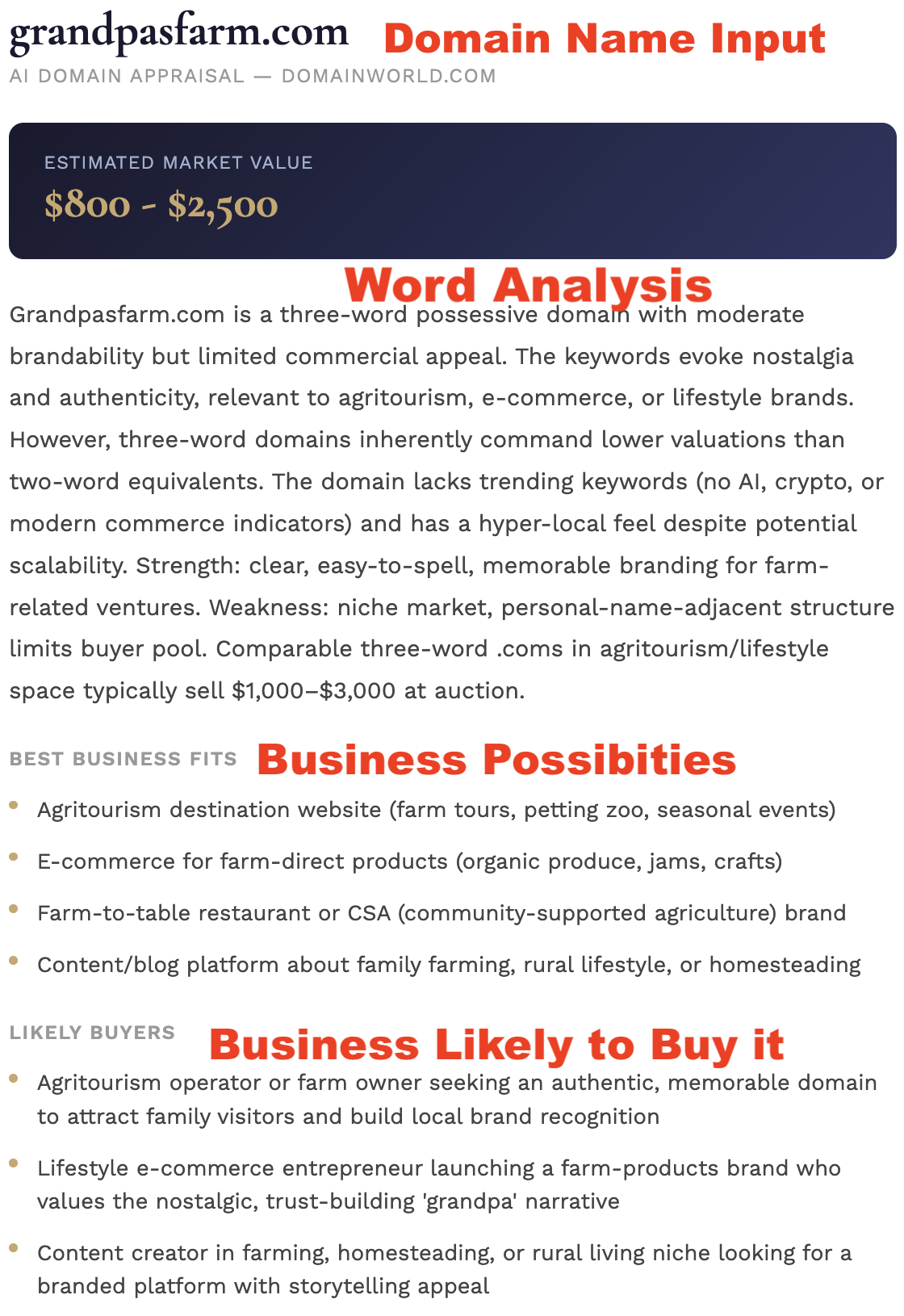
Get an instant AI-powered valuation of any domain name — before you buy, before you list, or just out of curiosity. Members get 5 free appraisals per day. Additional appraisals beyond the free tier cost 3 credits each.
Type any domain name into the appraisal tool — it doesn't have to be listed on DomainWorld. The AI evaluates the name itself, not any specific listing.
The appraisal considers length, memorability, keyword strength, TLD value, commercial appeal, and comparable sales patterns. Results appear in seconds.
You'll receive a low/high value range, a breakdown of key factors driving the estimate, and notes on what could increase or decrease the value.
Guests get 2 free appraisals per day. Registered members get 5 free per day. Beyond that, each appraisal costs 3 credits — a small price for a research tool that replaces hours of guesswork.
Talk directly to the seller in real time — no middlemen, no ticket systems. Sellers control when they're available. If a seller is offline, both parties receive each other's contact details by email so the conversation can continue. Chat transcript is emailed to you.
Look for the chat icon on any domain card. Click it to open the chat initiation screen. You'll need to be logged in to start a chat.
Before connecting, enter a brief topic or opening message — what do you want to discuss? This helps the seller decide whether to accept, and gives the conversation a clear starting point.
The seller receives an alert in their presence window and can accept your request. Once accepted, a live chat room opens for both of you — type freely, in real time.
Your topic and contact details are emailed to the seller. The seller's email is also sent to you so you can follow up directly. No chat session is lost — the conversation always continues.
From your dashboard, click "Go Online" to open your presence window in a new tab. Keep it open while you're available. A bell rings when a buyer initiates — accept or mark yourself busy.